


Secretly Track A Car
Key Takeaways
- 01Real-time GPS trackers show exactly where a company vehicle is right now, not just where it was.
- 02Geofencing alerts you the moment a vehicle leaves an approved job site or service area.
- 03Magnetic trackers mount in seconds and move between vehicles without tools.
- 04OBD2 plug-in trackers also surface diagnostics, fuel use, and maintenance alerts — not just location.
- 05Employee notification matters — several states legally require it, and it's good practice everywhere.
GPS Tracking for Business Vehicles: How to Monitor Your Company Fleet
Fuel costs more than it used to. Routes get longer than they should. And every so often, a mileage report shows up with a couple hundred extra miles nobody can quite explain. If you run vehicles for a living — a delivery van, a service fleet, a single work truck — you already know how fast small inefficiencies add up.
GPS tracking is the most direct way to close that gap. It won't fix a bad route on its own, but it tells you where the problem actually is, instead of guessing. And done right — with a clear policy and your team looped in — it's a normal part of running a fleet, not a gotcha.
This guide covers five trackers built for exactly that: real-time location, service-area alerts, and the kind of data that turns "something feels off" into an actual answer. We'll also walk through what the law expects of you before you put a tracker on a vehicle someone else drives.
At a Glance: Business Vehicle GPS Trackers
| Tracker | Best For | Price | Monthly Fee |
|---|---|---|---|
| SpaceHawk | Overall fleet tracking | Under $100 | Yes |
| Vyncs | OBD2 plug-in + diagnostics | $39.99 first-year activation | None the first year |
| SpyTec GL300 | Pocket-sized, multi-use | ~$39.00 | From $22.95/mo |
| Spark Nano 7 | Long-haul, infrequent access | From ~$149.00 | From $17.99/mo |
| Tracki | Budget equipment tracking | $18.88 | Varies |
1. SpaceHawk – Best Overall for Fleet Tracking

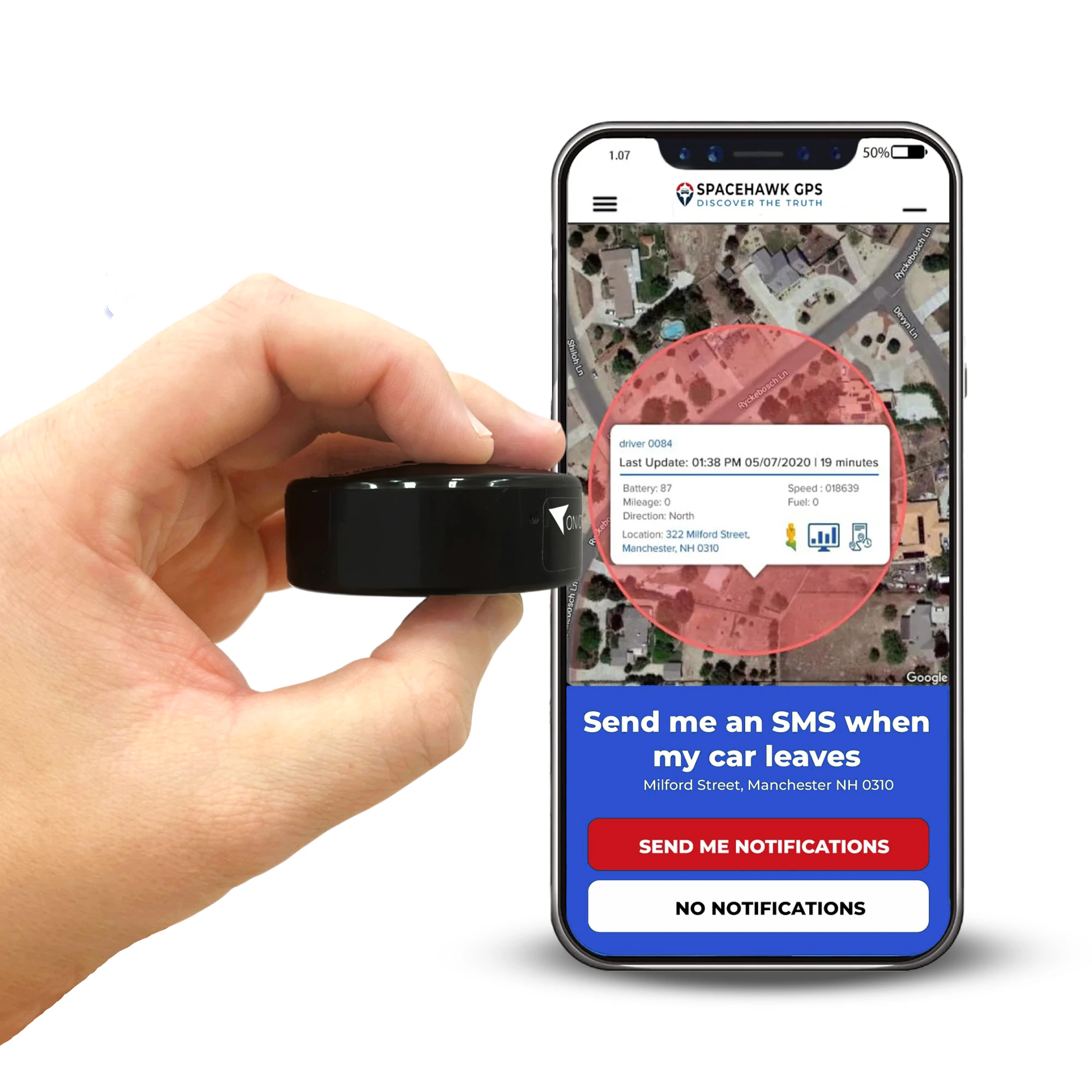
SpaceHawk is built for exactly this job: knowing where a work vehicle has been, how long it sat at each stop, and whether it's moving right now. It's compact, waterproof, and mounts with a magnet strong enough to stay put through a full shift of stop-and-go driving.
The motion sensor is the part fleet managers tend to like most — it puts the tracker to sleep whenever the vehicle is parked, which stretches battery life without you having to think about it. Between that and the real-time alerts, it's a low-maintenance way to get visibility into a fleet you can't watch in person all day.
Key Features & Specs
- Real-time tracking and mapping via web dashboard or mobile app
- Compact, fully waterproof housing with a strong built-in magnet
- Text and email alerts, geofencing, and full location history
- Motion sensor pauses tracking — and saves battery — when the vehicle is parked
- Attaches to a vehicle exterior or fits inside a cab, toolbox, or equipment case
Pros & Cons
Pros
- Fast, accurate real-time updates
- Motion-sensing battery saver needs no manual setup
- Magnetic mount works across multiple vehicles in a fleet
- Full address-level location history, not just a dot on a map
Cons
- Requires an ongoing subscription for full functionality
- App is functional but not the most polished on this list
Managing more than one vehicle? SpaceHawk's magnetic mount moves between trucks in seconds — no reinstall, no tools.
See SpaceHawk →2. Vyncs – Best OBD2 Plug-In Tracker

Vyncs plugs straight into a vehicle's OBD2 port, so there's no battery to manage and no mounting to think about — it just runs off the car. That also makes it a fuller fleet-management tool than a standalone tracker: alongside location, it reads fault codes, fuel economy, and maintenance data, and it flags if the device gets unplugged.
The tradeoff is visibility. Because it lives in the OBD2 port, it's easy for anyone who opens the glovebox or checks under the dash to spot — worth knowing if theft recovery is a priority, since a tracker that's easy to find is also easy to remove.
Key Features & Specs
- 4G LTE tracking with a one-time $39.99 activation covering the first year
- Direct OBD2 connection — no battery, no charging
- Vehicle diagnostics, fuel economy, and maintenance alerts
- Real-time updates every minute, with sleep mode when the ignition is off
- Geofencing, speed alerts, and shared account access for multiple users
Pros & Cons
Pros
- No monthly fee in year one
- Doubles as a diagnostics and maintenance tool
- Tamper alert if the device is unplugged
- Global support across 200+ countries
Cons
- Fixed to the OBD2 port — no flexibility in mounting location
- Easy to spot on a quick interior check
- Second-year renewal jumps to $78.93
3. SpyTec GL300 – Best Pocket-Sized Tracker

SpyTec's GL300 is small enough to toss in a glove box or a tool bag, which makes it useful beyond just vehicles — equipment trailers, generators, anything that occasionally walks off a job site. Global 4G coverage means it works the same whether a crew is local or out of state.
The app isn't as clean as SpaceHawk's, and you'll want to budget for the subscription, but the update frequency is adjustable, so you can trade battery life for more frequent pings depending on what you're tracking.
Key Features & Specs
- Compact enough for vehicles, equipment, or trailers
- Global 4G coverage with an iOS/Android app
- Adjustable update frequency, battery life up to 13 days
- Geofencing, speed alerts, and historical playback via the Time Machine feature
- Subscription starting at $22.95/month on an annual plan, with 24/7 support
Pros & Cons
Pros
- Versatile — works for vehicles, equipment, or assets
- Solid global coverage
- Adjustable ping rate to balance battery vs. frequency
Cons
- App experience is less polished than SpaceHawk's
- Subscription required for full functionality
4. Spark Nano 7 – Best for Long-Haul or Low-Access Vehicles

If a vehicle sits for weeks between check-ins — a seasonal truck, a trailer in storage, a vehicle out on a long-haul route — battery life becomes the whole decision. The Spark Nano 7's extended battery option is built for exactly that: months of runtime without a recharge.
It costs more than most trackers on this list, but for a vehicle you can't easily get back to, that's the tradeoff worth making.
Key Features & Specs
- 4G coverage across the US, Canada, and Mexico
- Durable, waterproof case with optional discreet exterior mounting
- Live tracking with speed, location, and travel history online
- Extended battery pack option stretches runtime to months, not weeks
- Three no-contract subscription plans starting at $17.99/month
Pros & Cons
Pros
- Best-in-class battery life on this list
- No-contract plans, cancel anytime
- Rugged, waterproof build
Cons
- Higher upfront cost with the extended battery pack
- Waterproof case is an added-cost accessory
5. Tracki – Best Budget Option for Equipment

Tracki is the cheapest device here by a wide margin, and it's genuinely one of the best-selling trackers on Amazon. For a low-stakes use case — tagging a piece of equipment, a spare vehicle, anything you just want a rough location on — it does the job.
For something you're relying on day to day, the gaps show up fast: the mobile experience isn't great, and support has about a 24-hour turnaround. Fine for a backup. Not what we'd put on a primary work vehicle.
Key Features & Specs
- Unlimited-distance 4G LTE tracking, international SIM included
- Small and light (1.8 × 1.6 × 0.7 in, 1.26 oz)
- Battery life from 2–5 days on frequent updates up to 60 days in saver mode
- Geofencing, SOS, low-battery, and speed alerts
- Lifetime warranty for lost or damaged devices
Pros & Cons
Pros
- Lowest price on this list by far
- Lifetime warranty included
- Flexible battery-saver mode for infrequent-use assets
Cons
- Mobile data view isn't as easy to read as competitors'
- Support response time runs about 24 hours
Tracking Company Vehicles: What the Law Expects
Tracking a vehicle your business owns is legal in every state we're aware of — it's standard fleet management. But "legal" and "no strings attached" aren't the same thing, and the details matter more than most owners expect going in.
| Key Point | What It Means |
|---|---|
| Company-owned vehicles | Tracking a vehicle your business owns is generally legal and a normal part of fleet management — monitor routes, improve safety, and cut down on unauthorized use. |
| Employee notification | A number of states legally require notifying employees that a work vehicle is tracked. Even where it isn't required, disclosure is the standard that holds up best — both legally and with your team. |
| Scope of monitoring | Keep tracking limited to vehicle location and use, not an employee's life. A short written policy on what's tracked and why goes a long way. |
| Data access and retention | Decide up front who can see tracking data and how long you keep it. Fewer people with access, and a clear retention window, reduces risk if the policy is ever questioned. |
| When in doubt, ask a lawyer | Rules vary by state, and employee-monitoring law changes more often than most owners realize. A quick consult before rolling out a fleet policy is cheap insurance. |
None of this is legal advice — it's a starting point. If you're setting up tracking across a fleet for the first time, loop in counsel before you finalize a policy.
Ready to see where your fleet actually goes?
SpaceHawk gives you real-time location, geofencing, and theft alerts — with a magnetic mount that moves between vehicles in seconds.
See SpaceHawk →FAQs
Is it possible to track a business vehicle with a GPS device?
Yes — GPS trackers are a standard tool for fleet management. A magnetic tracker can be moved between vehicles as needed, while an OBD2 device like Vyncs plugs in and stays with one vehicle, adding diagnostics alongside location.
Do GPS trackers require a monthly subscription fee?
Most do, but not all. Some devices, like certain plug-and-play OBD2 trackers, skip the monthly fee entirely or waive it for the first year. Worth checking before you buy if you're tracking a larger fleet, since the subscription cost adds up per vehicle.
What's the easiest way to track a company vehicle?
A real-time GPS tracker is the most straightforward option. It uses cellular networks to send location data to an app, so you can see where a vehicle is right now and get an alert if it leaves an approved area.
Do I need to tell employees their work vehicle is tracked?
In several states, yes — it's legally required. Even where it isn't, telling your team up front is the better call. A short, written policy explaining what's tracked and why avoids most of the friction that comes from finding out later.
Legal Disclaimer
This article is for informational purposes only and doesn't serve as legal advice. Fleet1st and its affiliates aren't liable for actions taken based on this content. Vehicle tracking, including of employee-driven company vehicles, may be subject to federal, state, and local law, and requirements vary by jurisdiction. It's your responsibility to understand and follow the laws that apply to your business. If you're unsure how tracking law applies to your fleet, consult an attorney before rolling out a policy.
 Buy on Amazon