

Employee GPS Trackers | Apps, Portable & Vehicle Options
Key Takeaways
-
01 Employee GPS tracking works best when matched to how workers actually move.
-
02 Portable GPS trackers suit contractors and temp staff who rotate sites and vehicles.
-
03 Vehicle-based GPS trackers deliver consistent data for drivers and route-heavy roles.
-
04 App-based GPS tracking fits phone-driven field roles with stable signal coverage.
-
05 Work-hours-only tracking improves employee acceptance and keeps monitoring legally defensible.
9 Best Employee GPS Trackers in 2026 (Apps, Portable & Vehicle-Based Options)

Hey, welcome to my best Best Employee GPS Trackers in 2026.
My name is Ryan Horban, and I bring more than 15 years of hands-on experience working with GPS tracking across fleets, field operations, and mobile teams. Writing a guide like this may sound simple, yet matching a tracker to the right type of employee rarely feels straightforward. Every role moves differently. Every team works under different pressure.
In this guide, I walk you through how different employee roles demand different tracking approaches. You'll see where app-based tools help, where portable trackers make more sense, and why vehicle-based systems still carry weight for certain teams. The goal stays practical: help you connect each type of employee with tracking that fits daily movement, safety needs, and accountability, without forcing a one-size approach that creates friction later.
At A Glance: 9 Employee GPS Tracking Options Compared
| Solution | Type | Best For | Price |
|---|---|---|---|
| SpaceHawk Portable | Device | Contractors, temps, lone workers | No monthly fee |
| Konnect OBD | Device | Sales reps & service vehicles | See price |
| Hardwired GPS Tracker | Device | Permanent fleets, compliance | See price |
| GPS Dash Cam | Device | Drivers, safety-focused teams | See price |
| Hubstaff | App | Hybrid teams & construction crews | From $7/user |
| Timeero | App | Mobile field technicians | From $4/user |
| ClockShark | App | Trades & job-site workers | Base fee + per user |
| Silent Beacon 2.0 | Wearable | Lone workers, safety-sensitive roles | See Amazon |
| SpaceHawk No Monthly Fee | Hybrid device | Mixed workforce, rotating crews | No monthly fee |
How We Selected These 9 Employee GPS Tracking Solutions

I didn't build this list by skimming feature pages or copying vendor claims. Every solution here earned a place based on how tracking behaves once teams start moving and real pressure shows up. Over the years, I've watched tools succeed, fail, and frustrate crews in ways brochures never mention.
Selection started with real-world deployment. I looked at tracking that holds up across long shifts, dead zones, rushed mornings, and end-of-week payroll reviews. Reliability came next. Location data needs consistency, not perfection on paper. Gaps, delays, or missing records quickly erode trust.
Privacy boundaries also carried weight. Tracking should follow work activity, not personal time. Tools that respect that line see far better employee acceptance. Audit readiness carried equal importance. Location history must support timecards, mileage, and disputes without guesswork.
Finally, I considered employee acceptance. When crews resist a tracker, usage drops and accuracy follows. Every option here balances oversight with daily reality, which keeps tracking usable long after rollout.
Device-Based Employee GPS Tracking Solutions
Device-based employee GPS tracking uses dedicated hardware instead of personal phones to record movement during work. Tracking stays connected to vehicles, equipment, or portable units that travel with the job, not with a phone that can lose charge or signal. This approach keeps location records tied to actual work activity, which helps managers rely on consistent data and helps teams avoid confusion around when tracking should run.
With device-based GPS tracking, teams gain several practical advantages during daily operations:
- Continuous tracking during long shifts, rural routes, and changing schedules
- Clear separation between work tracking and personal phone use
- Stronger reliability during dispatch, route changes, and job overruns
- Stable location history that supports timecards, mileage reviews, and internal checks
Below, you'll find the best-performing device-based GPS options selected for employee tracking, each matched to the field where performance, reliability, and acceptance stay strongest. These devices suit drivers, contractors, rotating crews, and operations where dependable tracking shapes everyday decisions rather than occasional check-ins.
SpaceHawk Portable GPS – Contractors, Temps, Lone Workers

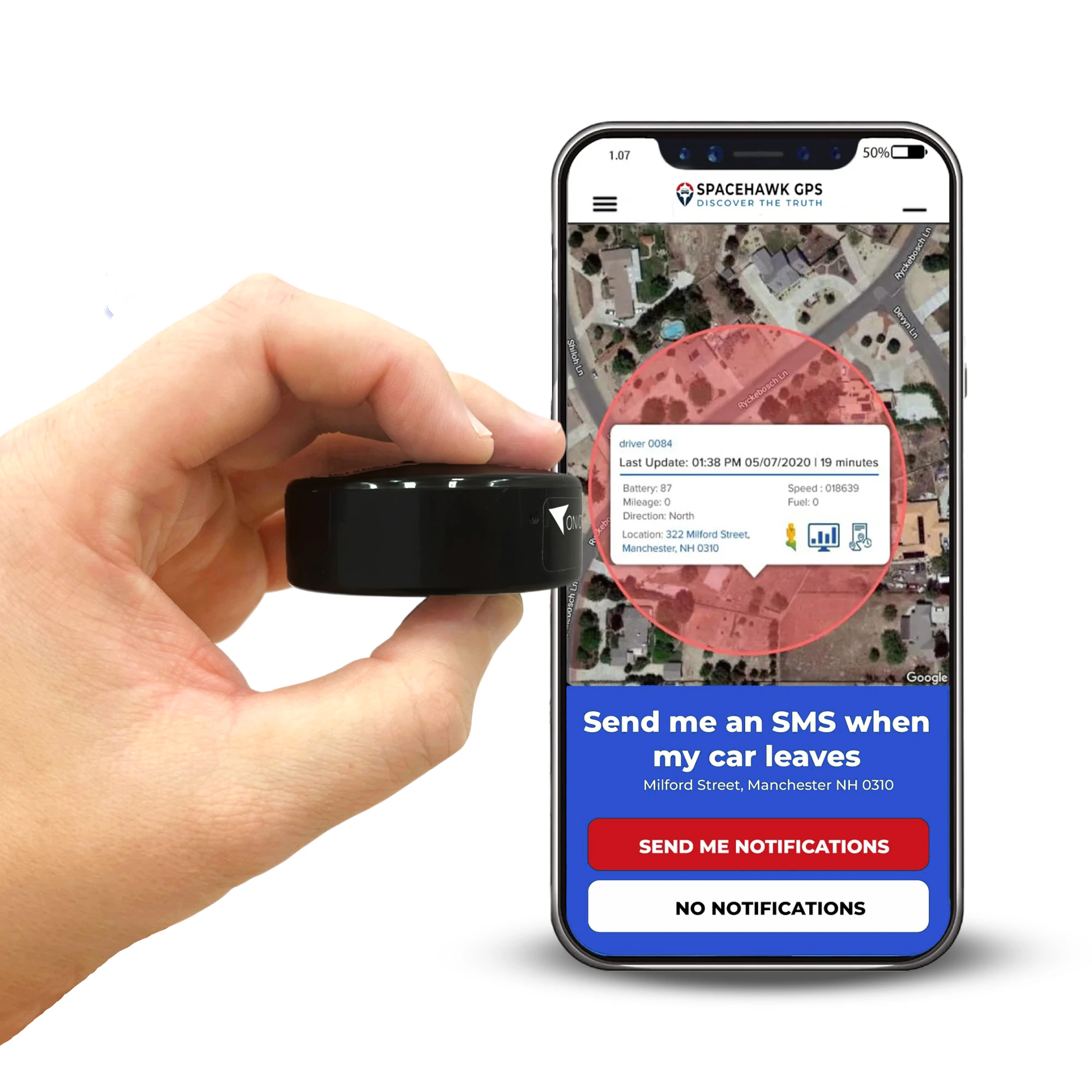
SpaceHawk is a portable GPS tracking device built for employee tracking scenarios where phones and fixed vehicles fail to keep up. This device travels with the worker, not with a car or an app, which makes tracking consistent across changing job sites, shared vehicles, and rotating crews. From field experience, portable hardware like SpaceHawk solves many tracking gaps created by phone shutdowns, app misuse, or device sharing.
SpaceHawk works especially well in environments where visibility, safety, and accountability must stay reliable without relying on employee-owned technology.
Best for: Contractors, temporary staff, lone workers, inspectors, and mobile crews without assigned vehicles
Key Features & Benefits
- Portable GPS tracking that follows the worker across sites and shifts
- No smartphone apps or personal device access required
- Consistent location reporting during long shifts and remote assignments
- Strong fit for safety monitoring in lone-worker scenarios
- Simple deployment for short-term crews and rotating staff
Pros & Cons
Pros
- Tracking remains active regardless of phone use or battery levels
- Clear separation between work monitoring and personal devices
- Reliable option for contractors and temporary teams
- Works across vehicles, equipment, and on-foot movement
- Supports location records useful during reviews and investigations
Cons
- Requires physical device management and assignment
- Limited timecard editing compared to app-based platforms
- Not designed for desk-based or office-only roles
SpaceHawk fits employee tracking situations where reliability outweighs convenience. In roles involving contractors, temporary labour, or lone workers, tracking tied to phones often breaks down. A portable GPS device keeps visibility consistent, boundaries clear, and acceptance higher across teams that move differently every day.
No monthly fee, no app dependency. SpaceHawk stays active whether a phone is charged or not.
Check PriceKonnect OBD GPS Tracker – Sales Representatives & Service Vehicles

Konnect is built for vehicles that stay in regular rotation and need consistent, live visibility without complicated installs. This tracker plugs directly into a vehicle's OBD2 port and starts reporting almost immediately. I've seen setups like this work best for sales teams and service vehicles because the tracker stays with the vehicle, not the driver, and keeps location records clean across shifts.
What makes Konnect practical in daily operations is speed and simplicity. Vehicles can be added quickly, tracking runs continuously while the vehicle is in use, and managers don't need to rely on drivers remembering to open an app or enable settings. For teams covering routes, client visits, or service calls, that reliability keeps dispatch and oversight straightforward.
Best for: Sales reps, service technicians, pool vehicles, light fleet operations
Key Features & Benefits
- Plug-and-play OBD2 installation completed in seconds
- Live GPS updates as frequently as every 3 seconds
- Real-time location, route history, and trip review
- Speed alerts and virtual boundary notifications
- Mobile and web access for managers and supervisors
Pros & Cons
Pros
- No wiring or tools required for installation
- Tracking remains tied to the vehicle, not a personal phone
- Fast update frequency supports route oversight and response
- Simple onboarding for growing fleets
- Works well for shared or rotating drivers
Cons
- Requires vehicles with an OBD2 port
- Not suitable for on-foot or non-vehicle roles
- Basic focus on location and movement rather than advanced vehicle diagnostics
Konnect suits teams where vehicles are the centre of daily work. For sales reps and service fleets, tracking tied directly to the vehicle keeps location data consistent, reduces driver friction, and supports faster decisions during the day. It's a clean fit for operations that value speed, clarity, and simple deployment over app-heavy workflows.
Hardwired GPS Tracker – Permanent Fleets & Compliance-Heavy Roles

Hardwired GPS trackers are designed for fleets where vehicles stay assigned long-term and tracking cannot depend on removable devices. These units install directly into a vehicle's electrical system, which keeps tracking active whenever the vehicle operates. In compliance-focused environments, this setup removes guesswork and limits the chances of devices being unplugged, misplaced, or forgotten.
Hardwired trackers consistently perform best in regulated fleets where reporting accuracy, accountability, and continuity outweigh convenience. After installation, tracking runs silently in the background and produces stable records over months or years. That reliability supports audits, internal reviews, and operational oversight without requiring daily driver involvement.
Best for: Commercial fleets, regulated industries, delivery operations, utilities, long-term service vehicles
Key Features & Benefits
- Permanent installation connected to vehicle power
- Continuous tracking whenever the vehicle is running
- Reliable route history and location logs
- Reduced risk of device removal or tampering
- Strong fit for audit and compliance requirements
Pros & Cons
Pros
- Tracking remains active without driver interaction
- Ideal for vehicles assigned to specific roles or routes
- Produces consistent long-term location records
- Supports internal controls and operational reporting
- Lower risk of data gaps caused by unplugging
Cons
- Requires professional installation
- Not practical for short-term or rotating vehicles
- Less flexibility compared to portable or plug-in devices
Hardwired GPS tracking works best when oversight needs to stay consistent year-round. For fleets operating under regulatory pressure or internal controls, permanent installation delivers stable data and fewer variables where long-term reliability matters most. Once installed, these trackers keep location history dependable, which helps teams focus on operations rather than monitoring the tracker itself.
GPS Dash Cam With Tracking – Drivers, Safety-Focused Teams, Liability-Heavy Roles

A GPS dash cam combines location tracking with forward-facing video, which changes how driving behaviour and incidents get reviewed. Instead of relying on location dots alone, teams can see what happened on the road and where it happened at the same time. For driver-heavy operations, that context becomes critical the moment an incident, complaint, or claim surfaces.
I've seen dash cams work best in roles where driving risk is part of the job. The camera discourages unsafe habits, while GPS data ties every clip to a route, speed, and timestamp. That pairing supports fair reviews and quicker resolution when questions come up, without turning daily driving into a constant back-and-forth.
Best for: Delivery drivers, service fleets, transport teams, safety-sensitive driving roles
Key Features & Benefits
- Integrated video recording linked to GPS location
- Route history paired with timestamps and speed data
- Event-based clips for sudden stops or impacts
- Continuous recording while vehicles operate
- Centralized access for reviews and training
Pros & Cons
Pros
- Adds visual context to location data
- Helps resolve disputes and claims faster
- Encourages safer driving habits
- Useful for coaching and incident review
- Strengthens internal accountability
Cons
- Requires installation and camera placement
- Higher upfront cost than GPS-only devices
- Video storage management needs planning
Dash cams fit teams where driving carries responsibility beyond arrival times. When safety reviews, liability questions, or driver feedback are part of daily operations, video paired with GPS tells the full story. That clarity protects drivers, supports managers, and brings facts to conversations that would otherwise rely on assumptions.
App-Based Employee GPS Tracking Solutions (Smartphone-Dependent)
App-based employee GPS tracking runs through software installed on a worker's phone. Tracking starts and stops based on clock-ins, app settings, and phone behavior, which makes this option flexible but also dependent on how the device is used throughout the day. When everything goes right, apps provide helpful visibility for mobile teams. When phones lose signal, batteries drain, or settings get changed, tracking quality can slip without warning.
In day-to-day operations, app-based tracking brings a specific set of trade-offs teams should understand before rollout:
- Tracking relies on employees carrying, charging, and using smartphones correctly
- Location accuracy can shift based on signal strength and device permissions
- Setup stays fast and deployment costs stay lower than hardware-based options
- Works best for roles already tied closely to mobile apps and schedules
Below, I've highlighted the top-performing app-based GPS tracking tools for employee use, matched to the roles where smartphone-dependent tracking delivers the most reliable results and causes the least friction during real workdays.
Hubstaff (iOS, Android) – Hybrid Teams & Construction Crews

Hubstaff works best when crews move between job sites and managers need time and location tied together without chasing updates. In construction and hybrid setups, phones are already part of daily work, so an app-based tracker fits naturally. What I've seen on real sites is that Hubstaff reduces the need for drive-bys and manual check-ins by keeping clocks, locations, and schedules visible from one place.
This approach suits teams where supervisors juggle multiple sites and want fewer gaps between what's planned and what actually happened during the day. When crews clock in on-site and locations log automatically, reviews get faster and scheduling gets tighter without adding friction to the work itself.
Best for: Construction companies, landscaping crews, real estate teams, hybrid field operations
Key Features & Benefits
- GPS-based time tracking tied to job sites
- Location visibility during active shifts
- Geofenced job sites for automatic clock-ins and clock-outs
- Editable timesheets with manager approval
- Expense tracking linked to field activity
- Web dashboards that sync time and location records
Pros & Cons
Pros
- Reduces manual time entry for moving crews
- Helps managers coordinate multiple job sites remotely
- Works well for teams already using smartphones
- Integrates with payroll and project tools
- Supports scheduling and reporting in one workflow
Cons
- Tracking depends on phone signal and battery levels
- Location gaps can appear in low-coverage areas
- Some features require higher-tier plans
- New users may need setup guidance during rollout
Hubstaff Pricing (Billed Monthly)
- Starter: $7 per user
- Grow: $9 per user
- Team: $12 per user
- Enterprise: $25 per user
A 14-day trial is available for testing features with live crews before full deployment.
Hubstaff fits teams that already live on their phones and move between job sites all day. For construction and hybrid crews, it connects time, location, and schedules in a way that cuts down travel, reduces back-and-forth, and keeps workdays easier to review once everyone clocks out.
Timeero (iOS, Android) – Mobile Field Technicians

Timeero works best for technicians who move between job sites throughout the day and need time, location, and mileage recorded together. In field service roles, travel time often causes confusion during payroll reviews and job costing. Timeero reduces that friction by tying movement, hours, and distance into one workflow that stays visible during active shifts.
From hands-on use across service teams, this platform fits technicians who drive frequently, stop often, and need location proof without carrying extra hardware. Tracking follows work activity during the shift and stops when the day ends, which keeps boundaries clear for both sides.
Best for: Field technicians, service crews, inspectors, maintenance teams
Key Features & Benefits
- GPS-based time tracking during active shifts
- Breadcrumb-style route history with timestamps
- Mileage tracking linked to job activity
- Geofenced locations for on-site clock reminders
- Scheduling tools for shifting field assignments
- Payroll integrations with QuickBooks, ADP, Gusto, and Paychex
Pros & Cons
Pros
- Strong fit for multi-stop daily routes
- Clear visibility into travel time and distance
- Simple mobile experience for technicians
- Useful records for reimbursements and reviews
- Works well without extra tracking hardware
Cons
- Tracking depends on phone signal and battery health
- Setup requires location permissions and user training
- Limited value for desk-based or vehicle-only roles
Timeero Pricing
- Basic: $4 per user/month
- Pro: $8 per user/month
- Premium: $11 per user/month
A 14-day trial allows teams to test tracking accuracy with live routes and schedules.
Timeero suits technicians whose workday revolves around movement rather than fixed locations. For service teams balancing labor hours, travel distance, and job timing, this tool keeps records aligned with how field work actually unfolds rather than how schedules look on paper.
ClockShark (iOS, Android) – Trades & Job-Site Workers

ClockShark is built for crews who start and finish their day on physical job sites. In trades work, accuracy depends on knowing when someone arrived, where they worked, and how long they stayed. ClockShark focuses on those basics and keeps tracking tied to job locations rather than abstract schedules.
From what I've seen across trade teams, this app fits electricians, plumbers, HVAC crews, and general contractors who move between sites but still work in clearly defined locations. ClockShark captures location pings during shifts and lays them out on a map so supervisors can review activity without chasing updates or driving site to site.
Best for: Construction trades, specialty contractors, on-site service crews
Key Features & Benefits
- GPS-based time tracking during active shifts
- Location pings recorded at regular intervals
- Map view showing where work occurred during the day
- Job and task-based time entry
- Street and satellite map views for site verification
- Offline capture with later sync when signal returns
Pros & Cons
Pros
- Strong alignment with job-site based work
- Simple experience for field crews
- Useful location records for time reviews
- Offline tracking helps in low-signal areas
- Clear separation between work time and off-hours
Cons
- Location updates occur less frequently than some mobile-first apps
- Route paths connect points rather than showing turn-by-turn travel
- Pricing includes a base fee that may not suit very small teams
ClockShark Pricing
Plans include a monthly base fee plus a per-user cost. Pricing varies by feature tier and team size, so reviewing current plans before rollout is recommended.
ClockShark fits trades where work happens on real job sites, not behind desks. For crews clocking in at physical locations and managers who need location-backed timesheets, it keeps tracking focused on where work actually took place during the day.
Specialized Employee GPS Tracking Use Cases
Advanced and mixed workforce scenarios
Not every workforce fits neatly into one tracking category. Some teams split time between vehicles and job sites. Others rotate roles, work solo part of the week, or move between short-term assignments. In these situations, a single tracking method often falls short because movement patterns change faster than policies can keep up.
Specialized GPS tracking use cases usually show up when standard app-based or vehicle-only setups start leaving gaps. That's where combinations, safety-focused tools, or role-specific devices step in to support how work actually happens instead of forcing teams into rigid systems.
These scenarios tend to share a few traits:
- Employees switch between driving, on-site work, and on-foot tasks
- Roles involve higher risk, isolation, or irregular schedules
- Teams include a mix of full-time staff, contractors, and temporary workers
- Oversight needs change depending on the task, not the job title
In the sections below, I cover GPS tracking options built for these edge cases. These setups focus on flexibility, safety visibility, and continuity across roles that don't follow predictable routes or schedules. For teams managing mixed responsibilities, this is often where tracking starts to feel useful instead of restrictive.
Silent Beacon 2.0 Panic Button – Personal Safety GPS (Panic-Enabled)

Best for: Lone workers, inspectors, security staff, remote field roles
Silent Beacon 2.0 is a compact personal safety GPS device built around rapid alerting and location clarity for workers in high-risk or isolated situations. Unlike phone-dependent tracking, this hardware unit stays ready without relying on apps, battery-hungry services, or signal permissions. A one-touch panic button sends live location updates and emergency alerts to managers or response teams, which helps close the gap that standard GPS tracking tools leave when workers face unexpected hazards.
Key Features & Benefits
- One-press panic alert with live location transmission to designated contacts
- GPS coordinates broadcast during emergencies, even without phone interaction
- Continuous tracking while on duty, independent of personal devices
- Wearable, lightweight design that stays with the worker rather than a vehicle
- Simple setup that doesn't require app permissions or phone pairing
Pros & Cons
Pros
- Emergency signaling works without a smartphone, which improves reliability
- Strong fit for isolated environments where help may be minutes away
- Continuous location visibility throughout duty hours
- Clear separation between personal phone use and work tracking
Cons
- Not designed for timecards, mileage, or productivity reporting
- Requires device issuance and return processes
- Limited value for low-risk or office-based roles
When employee safety takes precedence over productivity metrics, a panic-enabled GPS tracker becomes indispensable. Silent Beacon 2.0 fills this niche by giving workers a direct way to signal for help and share exact location without pulling out a phone or navigating apps. In environments where seconds count, this device adds an essential layer of protection that vehicle-based and app-only systems cannot provide.
SpaceHawk No Monthly Fee GPS Tracker – Hybrid App + Device Setup (Mixed Workforce Operations)

Best for: Mixed fleets, field staff, contractors, and employee roles that rotate between vehicles and on-foot work
SpaceHawk No Monthly Fee GPS Tracker is a versatile portable tracking device that fits right into hybrid GPS tracking strategies. In operations where drivers use vehicles, technicians move on foot, and contractors rotate across sites, SpaceHawk provides consistent location visibility without relying on smartphones or recurring subscription costs. When paired with app-based tracking for phone-centric roles, this device fills the gaps that single-method systems leave behind.
Key Features & Benefits
- True phone-free GPS tracking tied directly to the worker or asset
- No monthly subscription required, lowering long-term operating costs
- Portable design that travels with employees across job sites
- Continuous location reporting during duty hours
- Works with centralized dashboards alongside app-based tracking tools
Pros & Cons
Pros
- Delivers reliable GPS data independent of phones, apps, or driver behavior
- Reduces tracking blind spots in teams with mixed movement patterns
- Ideal for temporary crews, rotating staff, and shared equipment
- Simple deployment with minimal setup and management
Cons
- Requires device assignment and return processes
- Not necessary for roles already fully handled by app-centric tools
In hybrid workforces, a one-size tracking tool rarely captures every role accurately. SpaceHawk's portable design solves this by offering consistent, hardware-based location visibility for non-vehicle and cross-role scenarios. When combined with app-based tracking on smartphones and vehicle-mounted GPS for drivers, this device creates a flexible, role-aligned view that supports oversight wherever work happens. It's especially useful when teams include field staff, contractors, and shared assets that traditional tracker types don't cover consistently.
GPS Tracking Options Explained (Apps vs. Devices vs. Portable Trackers)
Before picking a tracker, it helps to understand how each category behaves once real work starts. The differences aren't technical on paper; they show up during long shifts, missed signals, payroll reviews, and questions that surface weeks later. This section breaks down how each option performs in day-to-day operations so you can match tools to reality, not assumptions.
GPS Tracking Apps – Strengths, Limitations, Best-Fit Roles

GPS tracking apps run on employee smartphones and activate during clocked-in hours. They work best when phones are already part of the job and movement stays predictable. Apps offer quick rollout and lower upfront cost, but tracking quality depends on phone behavior throughout the day.
Apps tend to fit:
- Technicians and crews who already rely on mobile apps
- Roles with stable signal coverage
- Teams that need time tracking and location together
They struggle when phones die, signals drop, or settings change mid-shift.
Vehicle-Installed GPS Trackers – OBD, Hardwired, Dash Cam
Vehicle-installed trackers stay with the vehicle, not the driver.

OBD GPS trackers plug into a vehicle's OBD-II port and start tracking immediately. This setup fits sales routes, service vehicles, and shared fleets that need fast deployment without installation downtime. Location data stays attached to the vehicle across shifts, removing dependence on phone apps or driver behavior.
Hardwired GPS trackers connect directly to a vehicle's power system and remain hidden once installed. This setup fits delivery fleets, utilities, and compliance-heavy operations where long-term reliability matters most. Continuous power keeps the location history stable across months of operation.
GPS dash cams with tracking pair vehicle location with recorded road footage on the same timeline. Driving events, routes, and video stay aligned during reviews. Safety-focused fleets choose this option when incident clarity, driver accountability, and claim support carry weight.
Portable GPS Trackers – Phone-Free, Privacy-First Tracking

Portable trackers move with the worker and don't rely on personal devices. These units cover gaps where apps and vehicles fall short, especially when crews rotate vehicles or work alone.
Portable tracking suits:
- Contractors and temporary staff
- Inspectors and roaming roles
- Lone workers without assigned vehicles
- Short-term project crews without company-issued phones
- Roles requiring clear separation between work tracking and personal time
Tracking stays tied to work activity without touching personal phones.
This is exactly where SpaceHawk fits. Phone-free tracking for contractors, temps, and lone workers — no monthly fee.
Shop SpaceHawkWork-Hours-Only Tracking – Privacy & Compliance

Work-hours-only tracking limits data collection to active shifts. This boundary reduces friction with employees and supports compliance expectations by keeping monitoring focused on work activity only.
This approach helps:
- Maintain trust during rollout
- Separate personal and professional movement
- Reduce disputes around off-clock visibility
Clear start-and-stop rules keep tracking defensible and accepted. Businesses should also review employee GPS tracking laws before monitoring company vehicles across different states or outside normal work hours.
Offline Tracking & Data Sync – Remote And Low-Signal Environments
Offline tracking keeps location records intact when vehicles or crews move through low-signal environments. Trackers with onboard memory continue logging movement during coverage gaps, then sync that data once connectivity returns. This capability supports rural routes, underground parking, job sites, and long-distance travel where signal loss is routine. Without offline capture, location history breaks at the exact moments teams need answers most, leaving gaps in route records, time reviews, and incident follow-ups.
Route History & Audit Trails – Payroll, Disputes, Accountability

Route history shows where someone traveled during a shift and when. Audit trails link movement to timestamps, which supports payroll reviews, mileage checks, and dispute resolution.
Strong route records help:
- Verify timecards
- Review travel claims
- Answer client or internal questions later
Clean history reduces guesswork weeks after the job ends.
Tamper Resistance & Reliability – Fraud Prevention

Tracking loses value when devices get unplugged, apps get closed, or settings get changed. Tamper resistance limits those gaps and keeps records steady without constant supervision.
Reliable systems:
- Reduce manual oversight
- Lower manipulation risk
- Keep data consistent across teams
The more important the record, the greater the need for reliability.
Understanding these differences upfront makes selection easier. When tracking matches how people actually work, systems fade into the background, and that's when they start helping instead of getting in the way.
Which Employee GPS Tracker Fits Your Workforce?
The right tracker depends less on company size and more on how work actually moves during the day. When teams get mapped by role instead of titles, the decision becomes clearer and rollout friction drops fast. Below is a practical breakdown based on how employees work, not how org charts look.

Field Employees Using Smartphones – App-Based Tracking Use Case
Field employees who already rely on phones for schedules, updates, or forms usually adapt well to app-based tracking. Their day revolves around clock-ins, task switches, and short-distance travel, which apps handle reasonably well when signal stays steady.
This setup fits teams where:
- Phones are already part of daily workflow
- Work happens across multiple job sites
- Time tracking and location need to stay connected
- Flexibility takes priority over permanent installation
Apps struggle when phones go unused or coverage drops, but in phone-centric roles, they stay practical.
Contractors & Temporary Staff – Portable GPS Use Case
Contractors and temporary workers rarely follow consistent patterns. They change sites, share vehicles, and often use personal phones that shouldn't be part of tracking decisions. Portable GPS trackers solve that mismatch by staying tied to work activity only.
This option works best when:
- Workers rotate in and out of assignments
- Vehicles aren't permanently assigned
Portable tracking keeps boundaries clear while maintaining oversight.
Drivers & Vehicle-Based Employees – Vehicle GPS / Dash Cam Use Case
When work revolves around driving, tracking should stay with the vehicle. Vehicle-installed GPS and dash cams follow routes, stops, and movement without relying on driver behavior or phone settings.
This approach suits:
- Sales routes and service vehicles
- Delivery and transport roles
- Shared or pool vehicles
- Operations where route history is essential
Vehicle-based tracking stays consistent across shifts and drivers.
Lone Workers & Safety-Sensitive Roles – Portable + Safety GPS Use Case
Lone and safety-sensitive roles require more than passive tracking. In these situations, location visibility needs a response path when something goes wrong. Panic-enabled devices and portable GPS units fill that gap.
This setup fits:
- Inspectors and remote field staff
- Social services and security roles
- After-hours or isolated assignments
Here, tracking supports safety first and oversight second.
How To Choose The Right Employee GPS Tracking System
Choosing a system gets easier when decisions follow work patterns instead of feature lists. The steps below help narrow options before money or time is spent.
Identify Employee Roles – Decision Clarity

Start by listing how employees move during the day. Who drives? Who works on foot? Who rotates sites? Tracking choices become obvious once movement patterns are visible.
Focus on:
- Daily movement type
- Vehicle usage
- Shift structure
- Risk level
Tracking decisions work best when based on roles, not departments.
Decide App-Based Vs. Device-Based – Tool Selection Logic

Once roles are clear, decide whether tracking should follow a phone, a vehicle, or a person. App-based tools favor flexibility. Devices favor consistency. Mixing both often works best.
Use apps when:
- Phones stay active all shift
- Flexibility is a priority
Use devices when:
- Reliability outweighs convenience
- Phones cause gaps or resistance
Address Legal & Privacy Requirements – US + Global Compliance
Tracking should stay limited to work activity and clearly communicated before rollout. Transparency shapes acceptance and reduces pushback later.
Best practices include:
- Clear tracking policies
- Work-hours-only monitoring
- Role-based tracking rules
- Written employee acknowledgment
When tracking aligns with work purpose, adoption stays smoother and reviews stay simpler.
When tracker choice follows how people actually work, systems fade into the background. That's when GPS tracking stops feeling like oversight and starts working like infrastructure.
Why Businesses Use Device-Based Employee GPS Tracking

After working with fleets and field teams for years, I've noticed a clear pattern: when tracking needs to stay reliable under pressure, businesses lean toward device-based systems. Phones change. People forget. Settings get adjusted. Dedicated devices don't care about any of that. They just keep tracking where the work happens.
Device-based GPS tracking earns trust because it removes variables. Location data stays tied to vehicles, equipment, or assigned units, not personal habits. That consistency shows up when managers review routes, when payroll needs answers, and when questions surface long after a shift ends.
Businesses usually move toward device-based tracking for a few practical reasons:
- Tracking stays active without relying on employee interaction
- Data remains consistent across shifts, drivers, and job changes
- Oversight feels fairer because tracking follows work assets, not personal phones
- Records hold up better during audits, reviews, and internal checks
There's also an acceptance factor that doesn't get talked about enough. Employees tend to push back less when tracking is clearly attached to a vehicle or device issued for work. Boundaries feel clearer. Expectations stay simpler. That balance builds confidence on both sides.
For operations where accuracy matters more than convenience, device-based tracking becomes infrastructure rather than software. It runs silently, produces dependable records, and lets teams focus on the job instead of the tracker.
Ready to switch to device-based tracking? SpaceHawk needs no wiring, no app, and no monthly fee.
Shop SpaceHawkFinal Takeaway: Choosing The Right GPS Tracker For Each Employee
After all the tools, categories, and options, this decision comes down to one simple truth I've learned the hard way: tracking works only when it matches how people actually work. Problems start when companies force one tracker across every role and expect it to behave the same in trucks, job sites, and solo field work.
Some employees live on their phones all day. Others barely touch them once the engine starts. Some rotate vehicles weekly. Others stay in the same truck for years. When those differences guide your choice, tracking feels natural instead of forced, and the data finally lines up with reality.
If you are searching for a GPS tracker to maintain trailers: Best GPS Tracker for Trailers (2026)
If you need a GPS tracker to manage assets across job sites, this option lets you see where equipment is, whether it's moving with employees or sitting idle after placement: Asset GPS Tracking
The strongest setups follow a few clear rules:
- Apps work best where phones already drive the workday
- Vehicle-based trackers belong with drivers and route-heavy roles
- Portable devices fit contractors, temporary staff, and lone workers
- Safety-focused tools belong in place before risk rises, not after incidents occur
If there's one thing I want you to take from this guide, it's this: the "best" GPS tracker doesn't exist in isolation. The right one is the tracker that fits the employee, the job, and the way work unfolds hour by hour.
Choose based on movement, not job titles. Set boundaries early. Match tools to roles. When you do that, GPS tracking stops creating friction and starts delivering clarity you can actually use.
Not sure which tracker fits your team?
SpaceHawk covers contractors, temps, and lone workers with zero phone dependency and no monthly fee.
Shop SpaceHawk NowAuthor Disclosure
Written by Ryan Horban, GPS Tracking Specialist (15+ Years of Experience)
More than 15 years of hands-on work with GPS tracking systems shaped this guide. Daily exposure to real employee tracking setups, apps, portable devices, and vehicle-installed trackers, reveals where systems hold up and where they fail once crews start moving. Experience comes from working directly with fleet managers, field teams, contractors, and business owners who rely on location data for payroll, safety, and accountability.
Testing happens in real conditions, not demos. Long shifts, rotating vehicles, low-signal areas, and disputed records expose weaknesses quickly. This guide reflects those realities, focusing on tracking methods that respect work boundaries, stay reliable under pressure, and support clear decision-making without creating friction for employees.
👉 Connect with Ryan on LinkedIn →
🌐 Visit: https://ryanhorban.net

Frequently Asked Questions (FAQ)
Is Employee GPS Tracking Legal In The US?
Yes, employee GPS tracking is legal in the United States when used for legitimate business purposes and handled transparently. Employers must inform workers about tracking and clearly explain when and why monitoring happens. Most compliance issues arise when tracking extends beyond working hours or uses personal devices without consent.
Best practices many businesses follow include:
- Tracking limited strictly to on-duty time
- Written policies shared before deployment
- Clear separation between work activity and personal movement
- Company-owned vehicles or devices used for monitoring
State-level rules can vary, so businesses operating across multiple regions often review local requirements before rollout.
Do GPS Trackers Work Without Internet?
Some GPS trackers continue collecting location data without an active internet connection. These systems store data locally and sync once signal returns. This capability supports teams working in rural areas, basements, industrial zones, or on long-distance routes.
Tracking reliability improves when:
- Devices support offline data capture
- Sync occurs automatically after reconnecting
- Power supply remains stable during signal loss
Trackers without offline support usually stop recording the moment coverage drops.
Are Portable GPS Trackers Better Than Apps?
Portable GPS trackers and apps serve different roles rather than competing directly. Portable devices suit workers who change vehicles, avoid phone-based tracking, or work alone. Apps suit teams already dependent on smartphones throughout the workday.
Portable trackers work well when:
- Personal phone use creates resistance
- Vehicles rotate between workers
- Contractors or temporary staff rotate frequently
Apps perform better when:
- Phones remain active during shifts
- Time tracking and scheduling stay app-based
- Teams prefer minimal hardware handling
The stronger option depends on how work moves, not feature lists.
Can GPS Data Be Used For Payroll Disputes?
Yes, GPS data often supports payroll reviews when combined with timestamps and shift records. Location history helps confirm arrival times, time on site, and travel duration when questions surface later.
GPS records help during:
- Timecard reviews
- Mileage reimbursement checks
- Disputed job duration claims
- Client billing questions
The strongest records come from systems that capture consistent location data during active work periods and keep clear audit trails tied to schedules.
 Buy on Amazon