


How Geofencing Works in GPS Trackers (Stop Theft Fast)
Key Takeaways
-
01 Geofencing creates a virtual boundary using GPS coordinates around any location you choose.
-
02 Entry and exit alerts notify you the instant a car crosses your defined boundary.
-
03 Geofence accuracy typically ranges from 6 to 60 feet depending on signal and device quality.
-
04 Properly sized boundaries reduce false alerts caused by normal GPS signal drift.
-
05 Fast update intervals of 3 to 5 seconds mean geofence alerts arrive with minimal delay.
How Geofencing Works in GPS Trackers to Track Movement and Prevent Theft
So, you're trying to understand how geofencing works in a GPS tracker.
And yeah, on the surface, geofencing feels like a simple feature. You set a boundary, and you expect an alert when something moves. But once you start using it, things don't always behave the way you expect.
Alerts feel delayed. Accuracy seems off. And you're left wondering what's actually going on behind the scenes.
I've worked with GPS tracking systems over the 15 years in real-world setups, and once you understand how geofencing works in GPS trackers, those questions start to clear up. In this guide, I'll walk you through how geofencing works step by step, how it helps track movement and prevent theft, and what to expect in real-world use.
By the end, you'll know exactly how to set it up the right way and what makes it reliable day to day.
What Geofencing in GPS Trackers

Geofencing in GPS trackers means creating a virtual boundary around a specific location using GPS coordinates. When the tracking device enters or exits that defined area, the system detects the movement in real time and sends an instant alert to your phone.
Think of it like drawing a circle around your driveway, a job site, or your kid's school. You're basically telling the GPS tracking system, "This is the zone I care about."
And once that zone is set, everything starts running quietly in the background.
Here's what that looks like in real use:
- You park your car outside your house for the night.
- You set a geofence around that location using the app.
- The GPS tracker keeps checking its real-time location against that boundary.
- The moment the device exits that zone, the system sends an instant alert to your phone.
Now, on the surface, this feels simple. But what's happening behind that one alert involves GPS satellites, location data, and a tracking system working together in seconds and this is the part where things get interesting.
Let's break down what actually happens behind the scenes.
How Geofencing Works in GPS Trackers (Step-by-Step System)

Geofencing works in GPS trackers by using GPS satellites to track a device's location, sending that data through a cellular network to a server, and triggering alerts when the device enters or exits a defined virtual boundary. This entire process happens automatically in real time.
I know, on paper, that sounds straightforward.
But in real-world use, a lot is happening in the background every few seconds. I've seen this play out across vehicles, job sites, and even small asset tracking setups, and once you understand the flow, it all clicks.
Now, let's break it down step by step.
1. GPS Tracker Gets Location from Satellites

Every GPS tracking device connects to GPS satellites to figure out its exact geographic location. We're talking latitude and longitude, precise coordinates that update constantly as the device moves.
In most modern GPS tracking systems, location updates happen every few seconds (3-5 seconds). In my experience, a good geofencing tracker picks up movement almost immediately, especially in open areas with a clear sky view.
Now, this part is easy to overlook. But everything depends on it. If the device isn't getting accurate location data, the rest of the geofencing system won't respond the way you expect.
2. A Virtual Boundary Is Created
Next, you set up the geofence inside the app, which acts as your virtual boundary to the specific location you want to monitor.
In real use, this step is pretty straightforward, but the way you set it up makes a big difference in how accurate your geofence alerts will be. Most GPS tracking systems give you a couple of ways to define that boundary:
- A radius-based boundary: A simple circle around a location like your home or parking spot.
- A custom shape (polygon geofence): Better for irregular areas like job sites, warehouses, or large properties.
What you're doing here is defining a real-world zone and telling the system, "Send alerts if the device enters or exits this area."

I've set up hundreds of these across different use cases, and one thing I always recommend is giving your boundary a little breathing room. GPS isn't accurate down to the inch, so setting the geofence slightly larger than the exact spot helps avoid false alerts caused by small location shifts.
3. Location Data Is Sent Through the Network
Once the device knows its location, it sends that data through a cellular network (GSM) to the tracking platform. This part tends to get overlooked, but it's just as important as the GPS signal itself. The tracker, satellites, and your mobile app all stay connected through this constant flow of location data.
And if that connection drops, things slow down.
For example, in underground parking garages or low-signal areas, the device may still know where it is, but it can't report that location right away. And the result is simple, delayed alerts.
I've tested this in city garages and tight urban areas, and you can see the difference almost immediately. Out in the open, alerts come through fast but in enclosed spaces… not so much. Think of it like trying to send a text with one bar of signal. The message is ready, but it just takes a little longer to go through.
4. System Detects Entry or Exit Activity

At this point, the GPS system is watching closely to compare incoming location data with your boundary to determine if the device enters or exits the zone. Once the system sees that your device has crossed the boundary, it reacts.
That triggers a geofence alert.
You don't have to keep checking the app or refreshing a map. The system is constantly comparing location data in the background and responds the moment something changes. From what I've seen in real use, this is where geofencing starts to feel useful.
Depending on how you set it up, you can track a few different things:
- Entry alerts: You get notified when a device enters a location.
- Exit alerts: You're alerted when it leaves that area.
- Dwell time: Shows how long something stays in one place.
- Time-based alerts: Only send notifications during certain hours (like after work or overnight).
I've used this a lot in fleet setups. And that makes it easy to see if a vehicle actually reached a job site, left early, or stayed longer than expected. For personal use, it's even simpler. If your car moves when it shouldn't, you'll know right away without guessing or delay.
5. Alert Is Sent to Your Phone

Once the device crosses the boundary, the system sends a push notification directly to your phone.
Usually within seconds.
In most cases, you'll get that alert within a few seconds. In my testing, reliable GPS trackers with geofencing alerts usually respond in about 3 to 15 seconds, depending on signal strength and how often the device updates its location.
And when everything is working properly, it feels almost immediate.
You don't need to keep refreshing a map or wondering what's going on. The system tells you the moment something changes, and that makes geofencing so useful in real-world asset tracking.
How to Set Up Geofencing in a GPS Tracker

Setting up a geofence in a GPS tracker usually takes just a few minutes, but how you set it up can make a big difference in how accurate and useful your alerts are.
I've set up geofences on everything from personal vehicles to fleet systems, and the process is pretty similar across most apps. Once you've done it once, it becomes second nature.
Here's how it typically works:
Step 1: Open your GPS tracking app and select the device you want to monitor.
Step 2: Look for an option like "Create Geofence" or "Add Boundary".
Step 3: Draw your boundary on the map, use a circle (radius-based) for simple areas like home or parking and use a custom shape if you're dealing with job sites or larger properties.
Step 4: Set your alert preferences, choose whether you want entry alerts, exit alerts, or both and adjust notification timing if the app allows it.
And that's it, your geofence is live. Now, here's something I always recommend from experience.
Don't set your boundary too tight, or too wide.
As we know GPS isn't perfectly exact, so if it's too tight, small GPS shifts can trigger false alerts, especially near the edges of a driveway or parking spot. But if it's too wide, you might not get notified quickly enough when something actually moves.
Also, start simple. Set one or two important zones first like your home or a job site and get used to how the alerts behave. Once you're comfortable, you can always add more.
In most cases, the easier the setup feels, the more consistently you'll use it and that's what actually makes geofencing useful.
What Happens When a Vehicle Leaves a Geofence (Real Scenario)

When a vehicle leaves a geofence, the GPS tracker detects the change in location, the system identifies that the boundary has been crossed, and an alert is sent to your phone within seconds. This process happens automatically using real-time location tracking.
Picture this.
Your car is parked outside your house at night, and you've set a geofence around your driveway. Everything looks normal and then the car starts moving.
Here's what actually happens next:
- 0-3 seconds: The GPS tracker detects movement and updates its location using satellite data.
- 3-5 seconds: The system compares that new location with your geofence and detects that the vehicle has exited the boundary.
- 5-10 seconds: You receive an alert on your phone through the tracking app.
And at that point, you know something's wrong. You're notified immediately, while there's still time to do something about it.
I've tested this exact setup multiple times, and the timing is what makes the difference. That early alert gives you a head start, whether it's checking your car, calling someone, or taking action before things escalate.
How Geofencing Helps Track Movement and Prevent Theft
Geofencing helps track movement and prevent theft by sending instant alerts when a vehicle crosses a defined boundary, giving you real-time visibility and a critical time advantage to respond quickly.

In real use, I don't look at geofencing as just a feature, it works more like an early warning system. The geofencing system won't physically stop someone from taking your car. But it gives you something just as important, time. And in most situations, that makes the difference.
Here's how geofencing actually helps in day-to-day use:
- Detect unauthorized movement instantly: The moment a vehicle moves outside your set boundary, you get an instant alert.
- Track vehicle location in real time: You can open the app and see exactly where the vehicle is, as it's moving.
- Receive alerts when a car leaves a designated area: Whether it's your driveway, a job site, or a parking zone, you're notified the second it exits.
- Monitor driver behavior or unexpected usage: In fleet setups, this helps you spot route deviations, unauthorized stops, or off-hours usage.
From my experience, this early visibility makes a big difference in recovery situations. When you know something's wrong right away, you have a much better chance of acting before it turns into a bigger problem.
And in fleet environments, it becomes even more valuable. You can ensure company vehicles stay on route, reach job sites on time, and aren't being used outside approved areas.
How Accurate Is Geofencing in GPS Trackers?
Geofencing in GPS trackers is typically accurate within about 6 to 60 feet (2 to 20 meters), depending on signal strength, device quality, and surrounding conditions.

In real-world, most modern GPS tracking devices perform well under normal conditions. But accuracy isn't fixed, it changes based on where the device is and how strong the signal is at that moment. I've seen in testing, open areas with a clear sky view give you the best results. In those conditions, geofence alerts are fast and precise.
But once you move into more complex environments, things can shift a bit. Here are the main factors that affect geofencing accuracy:
- Tall buildings: Signals can bounce or reflect, causing slight location drift.
- Underground parking or enclosed spaces: Weak or lost GPS signal delays updates.
- Poor cellular coverage: Slows down how quickly location data is sent.
- Low-quality tracking devices: Less consistent location tracking and alert timing.
In open environments, accuracy feels solid and reliable. In dense cities or indoor areas, you might notice small delays or slight shifts in location. And this is how GPS technology behaves under varying signal conditions.
But keep in mind, geofencing only works as well as your GPS signal, here's a closer look at how accurate GPS tracking really is in real-world conditions.
Limitations of Geofencing You Should Know
Geofencing works reliably in most situations, but like any GPS based system, it has a few limitations depending on signal, device quality, and environment. Most articles either skip this part or keep it vague. From my experience, it's better to be clear about what to expect so you're not caught off guard later.

Geofencing is powerful, no doubt. But it's not perfect in every situation. Here are a few things to keep in mind:
In real-world use, these aren't major issues especially with a good-quality GPS tracker. But knowing how these factors affect performance helps you set more realistic expectations and avoid confusion.
If you're seeing inconsistent alerts, it often comes down to setup or signal issues, here's why GPS tracking sometimes shows incorrect locations and how to fix it.
Common Uses of Geofencing in GPS Tracking
Geofencing is used in GPS tracking to monitor movement, control access to specific locations, and receive alerts when devices enter or exit defined areas. It applies across personal, business, and fleet tracking scenarios.

You'll see geofencing used in a lot of real-world situations once you start paying attention to it.
From what I've seen, it's one of those features that quietly solves multiple problems at once, whether you're tracking a single car or managing an entire fleet. Here are some of the most practical ways it's used:
In fleet environments, this becomes even more valuable. You can quickly spot route deviations, delays, or unusual activity without constantly checking the system.
On the personal side, it's simpler but just as useful. You set a boundary once, and the system keeps watch for you. And over time, you start noticing how many small issues it prevents and without you having to think about it every day.
GPS Trackers That Support Geofencing
By now, you've seen how much geofencing depends on things like update speed, signal reliability, and how quickly alerts are triggered. And at this point the tracker you choose becomes more important.
A lot of devices can show location. But not all of them handle real-time alerts or boundary detection the way you actually need in day-to-day use.
SpaceHawk Mini GPS Tracker

From what I've tested, devices with faster update intervals tend to perform noticeably better when it comes to geofencing and especially in situations where timing is needed.
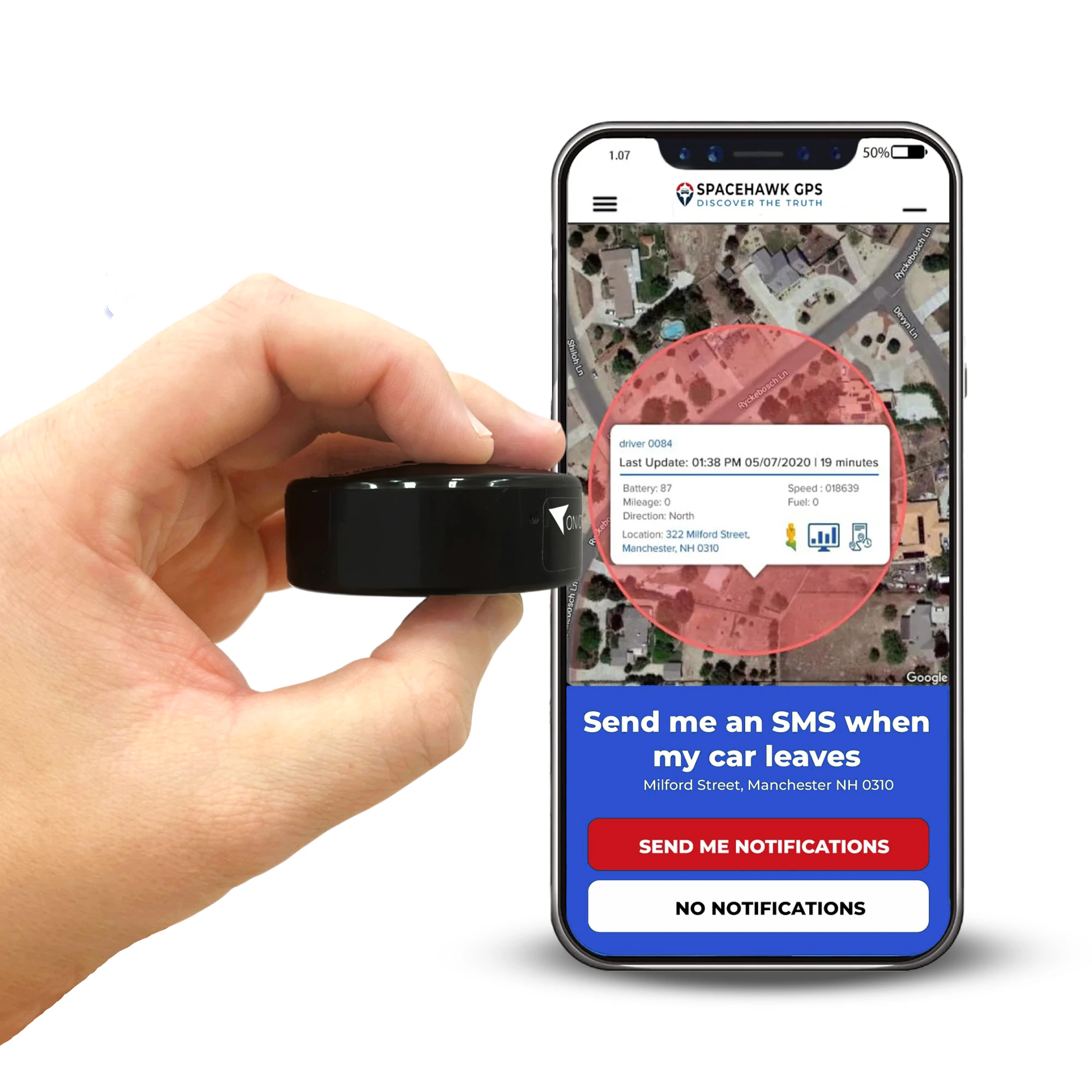
The SpaceHawk Mini GPS Tracker is one of those options that focuses on speed and simplicity. SpaceHawk updates location as fast as every 3 seconds, which means geofence alerts come through quickly instead of lagging behind movement.
In real use, that difference is easy to notice and you're seeing it as it happens. Here's where it fits well:
- Vehicle protection: Get alerted the moment a car leaves your driveway or parking area
- Asset tracking: Monitor equipment or tools and know instantly if they're moved
- Fleet or driver monitoring: Track route movement and catch unexpected activity early
- Personal use: Keep an eye on teen drivers or shared vehicles without constant checking
SpaceHawk is also designed to be simple to use without any complicated setup or wiring. You place it, open the app, and start tracking with real-time location, geofencing alerts, and movement history.
👉 If you're looking for a GPS tracker that keeps up with real-time movement and delivers geofence alerts without delay, SpaceHawk is worth considering.
Conclusion
By now, you've seen how geofencing actually works and not just the concept, but what's happening step by step behind the scenes.
Once you understand that flow, everything starts to feel more predictable. Alerts make sense, timing feels clearer, and you know what to expect from your GPS tracker in real-world use.
From my experience, the biggest difference comes from how you set it up and how well you understand its limits. Small adjustments like boundary size or signal conditions can make a noticeable difference in how reliable it feels day to day.
At the end of the day, geofencing is about awareness. Knowing when something changes, right when it happens. And when you have that kind of visibility, you're not just tracking instead you're staying one step ahead.
Now that you know how to track your fleet in real time, the next step is choosing a system that actually works for your vehicles. Here's a complete guide to different types of GPS trackers and how they work in real-world fleets.
If you want geofencing to actually work the way it's supposed to, the tracker you use makes a big difference.
A device like the SpaceHawk GPS Tracker gives you real-time tracking with 3-second updates, so you're not waiting around wondering what's happening. When a vehicle moves, you see it and you get the alert while it's still happening.
👉 Check out SpaceHawk GPS Tracker and see how fast, real-time geofencing should feel.

Frequently Asked Questions
What happens when a GPS tracker leaves a geofence?
Can geofencing help prevent car theft?
Geofencing can't physically stop a car from being stolen, but it helps prevent loss by alerting you immediately when a vehicle moves outside a defined area. As soon as the boundary is crossed, you receive a real-time notification, allowing you to act quickly.
In real-world use, that early alert makes a big difference. Instead of discovering the theft hours later, you know right when it happens. That gives you time to check the situation, contact authorities, or track the vehicle's location before it gets too far.
So, while geofencing doesn't block theft, it significantly improves your chances of responding fast and recovering the vehicle.
Do all GPS trackers have geofencing?
No, not all GPS trackers have geofencing. Some basic devices only show location and don't include boundary-based alerts.
Here's the difference in what you'll typically find:
- Basic GPS trackers: Show real-time location but don't send alerts when a device moves in or out of an area
- Advanced GPS trackers: Include geofencing features like entry, exit, and movement alerts
- App-based tracking systems: Allow you to set boundaries and receive instant notifications on your phone
From what I've seen, if you want geofencing to actually be useful, you need a tracker that supports real-time alerts and reliable updates, otherwise, you're just watching a map without knowing when something changes.
How do geofence alerts work?
Can geofencing track a stolen car?
Yes, geofencing can help track a stolen car by sending an alert the moment the vehicle leaves a defined boundary, allowing you to respond quickly and follow its location in real time.
Here's how it helps in a real situation:
- You get an instant alert as soon as the car moves outside your set area
- You can open the app and track the vehicle's live location as it's moving
- Early detection gives you time to contact authorities before the vehicle gets far
Geofencing won't stop theft on its own, but it gives you a critical time advantage, and in most cases, that's what improves recovery chances.
 Buy on Amazon