

What Is GPS Tracking Compliance for Commercial Fleets?
Key Takeaways
-
01 Lawful tracking has three parts: written driver notice before tracking begins, secure storage for the data, and a real business reason for collecting it.
-
02 FMCSA and DOT want clean records: accurate hours-of-service logs, verifiable mileage, and proof of safe operation.
-
03 Skipping the paperwork costs money, and it shows up as penalties, wage disputes, failed audits, and slower roadside inspections.
-
04 New Jersey has a tracking-device statute written for employee vehicles, and it requires written notice before you start.
-
05 Compliant tracking pays you back in faster inspections, fewer disputes, and audit-ready records across the fleet.
GPS Tracking Compliance for Commercial Fleets
Hey, is your fleet's GPS tracking compliance actually audit-ready, or just probably fine? Be honest, because an inspector will be.
I'm Ryan Horban, and I've spent the last 15 years working with GPS vehicle trackers and fleet tracking systems on real fleets. Operators ask me about compliance more than anything else, usually a week before an audit instead of a year before one. Honestly, the rules themselves aren't complicated. What trips fleets up is the gap between owning a tracking system and having the paperwork that proves you used it lawfully.
Below, you'll find what federal agencies require, where state law adds to it, and which records an inspector asks to see. Take the checklist first to spot your gaps, then jump to the sections that match them. You'll also see where tracker data helps and where it can't replace a process. Short on time before an audit? Skim the headings.
In Short: Ryan Horban, GPS tracking expert at Fleet1st, puts it this way. GPS tracking compliance comes down to three habits: tell drivers in writing before tracking starts, keep location data behind controlled access, and keep records for the right length of time. Federal rules set the baseline for ELD logs, and state law adds notice requirements on top. Fleet1st's Konnect tracker supplies the timestamped location records behind all three habits.
Is Your Fleet's GPS Tracking Actually Compliant?
Roadside inspections don't send a warning first. Compliant means your drivers were told in writing, your data is locked down, and your records would survive an audit. Tick off what's already true for your fleet, then use the gaps as a reading list.
Check off what is already true for your fleet.
0 to 2: time to build a policy. 3 to 5: a foundation is in place. 6 to 8: close to audit-ready.
Gaps in the timestamped trip record? Konnect fills that one automatically.
See Konnect for Fleets →
Recommended for This Guide
Built for Fleet Recordkeeping
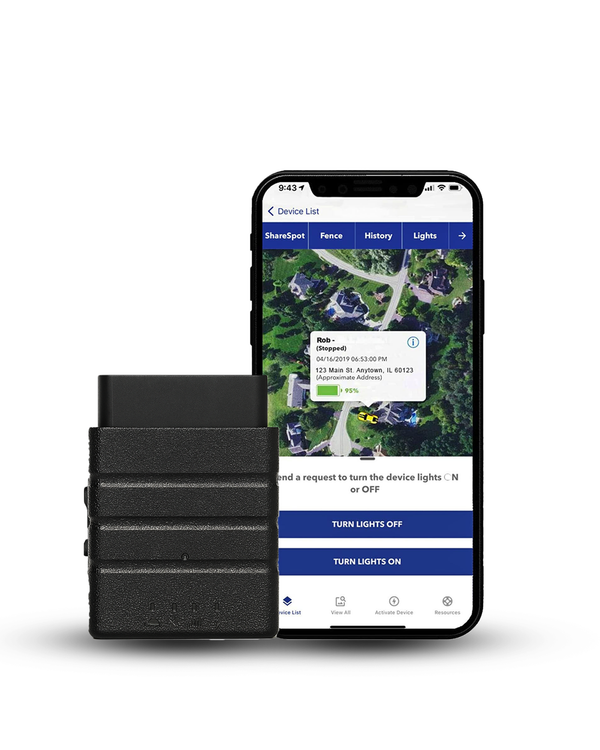
Your ELD handles hours of service. Konnect adds timestamped location data, so the trip history an auditor asks for already exists instead of being rebuilt by hand the week before an inspection.
Quick math: Konnect is $199.95 (regularly $249.95), and that price includes a full year of service, so there's no monthly bill in year one. After that, service runs $8.95 a month, and the device carries a lifetime warranty for normal use. Outfitting 10 vehicles comes to $1,999.50 once, then $1,074 a year ($8.95 x 12 x 10) from year two.
What GPS Tracking Compliance Means for Fleets
Compliance is a paperwork discipline as much as a technology one.
What does GPS tracking compliance actually cover? Three areas, all set by rules on how a fleet can lawfully monitor its vehicles: what data can be collected, how long it must be kept, and what drivers need to be told before tracking begins.
Protecting drivers' rights while giving the fleet accurate information for safety and daily operations is the whole goal.
When fleets follow the rules, the operation runs more smoothly. Managers get dependable hours-of-service data, maintenance teams plan repairs against real mileage, and drivers aren't left guessing about how and when monitoring works.

The Basics of Tracking Compliance
Compliance rests on three simple rules:
- Tell drivers: Drivers must be told when tracking is in use.
- Protect the data: Location data must be protected with secure storage.
- Keep a business purpose: Tracking must serve a real business need, not personal monitoring.
Get those three right and, in my experience, most audits stay boring.
Quick definition: Tracking compliance equals lawful collection, plus safe storage, plus transparent use of location data. Everything below is a variation on those three.
Signing a one-page notice at onboarding does most of the work.
Consider a delivery company rolling out new tracking units. Every driver gets a one-page notice explaining when monitoring starts, what information gets logged, and how long records stay stored. Once drivers sign and managers restrict access to authorized staff, the setup lines up with federal guidance.
Four markers separate compliant tracking from the risky kind:
- Written driver notice confirming when fleet tracking activates
- Secure storage with controlled access
- Accurate timestamps on every record
- Records kept for the required period, and no longer than needed
Clean procedures matter more than complicated systems.
Why Fleets Follow Tracking Rules
The roadside inspection is where documentation habits get graded.
Regulators expect accurate hours-of-service records, verifiable mileage, and proof of safe operation. Automated reports from a tracking system are what fleet managers lean on during an inspection, and the fleets that do well are the ones where those expectations have turned into daily habits.

Missed logs, unclear notices, or loose retention habits can trigger penalties, wage disputes, or a failed audit. Good documentation pays off in three ways:
- Faster FMCSA and DOT inspections
- Fewer disagreements with drivers about hours and routes
- Stronger footing if a claim is filed, backed by predictable, audit-ready records
None of that takes a bigger budget, just consistent habits.
The Effect on Daily Operations
Yesterday's logs are what make tomorrow's schedule realistic.
Rules shape the rhythm of a workday. Dispatchers gain clearer visibility, drivers stay within safe hours, and maintenance teams catch issues earlier.
Yesterday's trip review flags an unexpected delay on a key route. Accurate location logs show heavy congestion rather than a slow driver, and tomorrow's schedule gets adjusted before the problem repeats.
Day to day, that adds up to four things:
- Safer routing decisions
- Maintenance scheduled against real mileage
- Faster customer updates
- Smoother audits and fewer surprises
Small gains, but they compound over a quarter.
The right tracker makes most of this easier to maintain. Konnect logs timestamped location data automatically, so records aren't rebuilt by hand the week an audit lands.
See KonnectFederal Regulations Governing Fleet GPS Tracking
Your driver pulls into a weigh station, and the inspector asks for logs. What your system recorded decides the next few minutes. Federal rules set that baseline for every commercial fleet in the United States, with the agencies focused on accuracy, safety, and transparency in how vehicles record location and driving activity.
FMCSA Requirements
The ELD removes the manual step, which is where most log errors used to come from.
FMCSA rules focus on accurate tracking of duty status. ELD units record driving time, location, and engine activity without manual input, which cuts errors during hours-of-service checks. Drivers change status directly on the device, which gives an inspector a clean, timestamped trail at the roadside. Our guide on what an ELD is and how the mandate works covers exemptions and requirements in full.
FMCSA's ELD rules set five basics:
- Automatic capture of hours-of-service data
- Secure storage protected from alteration
- Clear driver identification
- Location accuracy of roughly a 1-mile radius while on duty
- Wider radius of roughly 10 miles during authorized personal use, so private trips aren't pinpointed
I'd pick an ELD that meets all five before worrying about extras.

Clean logs help fleets avoid violations and shorten inspection time.
DOT Safety Rules
DOT inspectors look at records to confirm safe operating conditions. Reliable mileage trails let maintenance teams schedule service before a breakdown, and engine-linked alerts give inspectors confidence during a compliance check.
More miles generally means faster wear on brakes, tires, and engine parts. Tracking data shows that progression, along with driving patterns and recorded downtime.
IFTA Fuel Tax Requirements
Every state line crossed is a separate line on the quarterly filing.
IFTA filings depend on accurate mileage across state borders.
Trip history replaces manual logs and gives auditors a straightforward way to verify distance traveled in each jurisdiction. Take a truck that leaves Indiana, passes through Ohio, and finishes a delivery in Pennsylvania. Mileage documentation has to show distance in each state, along with timestamps that match the fuel receipts. Tracking data produces that breakdown and takes the guesswork out of quarterly filing.
One honest note: Konnect's trip history shows where each truck ran, but you'll still match it against fuel receipts and your filing software.

Federal Data Retention Rules
According to the Federal Motor Carrier Safety Administration, a motor carrier must keep ELD records of duty status for six months, along with a backup copy stored on a separate device. Supporting documents such as dispatch records and fuel receipts are held for the same period so they line up with the ELD output files. Trip history usually sits alongside those logs and gives an auditor a fuller picture.
Retention rules sound rigid on paper and feel manageable with a system behind them. Organized folders, a consistent export schedule, and limited access controls keep a fleet compliant without adding daily work.
State-Level GPS Tracking Laws
Signatures at onboarding cost far less than the arguments that replace them.
Think of state tracking law as a patchwork of local speed limits, where every state posts its own number. Some states focus on notice, others on how long a company may monitor a vehicle once a shift ends. Policies flexible enough to satisfy the strictest state you operate in are easier to run than a pile of exceptions, and they give drivers one clear set of rules to follow.
One rule of thumb helps: clear notice, secure storage, and a legitimate business purpose will satisfy most state limits. Going a step beyond the minimum tends to pay off during a dispute. For a state-by-state breakdown, read our guide on whether you can legally track an employee's vehicle.
Notice and Consent Rules
Vendor pages and old drafts overstate the law here more than anywhere else, so let's be precise.
New Jersey is the clearest case. N.J.S.A. 34:6B-22, effective April 18, 2022, requires written notice before an employer knowingly uses a tracking device in a vehicle used by an employee. The statute doesn't separate company-owned vehicles from an employee's own car. Penalties run up to $1,000 for a first violation and up to $2,500 for each one after, collected by the Commissioner of Labor and Workforce Development. If you operate in New Jersey, written notice isn't optional.
The law also says it doesn't override federal interstate commerce rules, including FMCSA's electronic-device requirements. Ask an employment attorney how that applies to your ELD versus a separate GPS tracker.
Elsewhere the picture is less settled than it's often described. Connecticut, Delaware, and New York all have electronic-monitoring notice statutes, but those were written with workplace phone, email, internet, and on-premises monitoring in mind. Whether a tracker on a truck falls inside them hasn't been settled. Cautious readers, and I'm one of them, treat notice as required anyway, because it costs a fleet almost nothing to follow.

Drivers respond better when the message stays simple: who gets tracked, when monitoring begins, and how long records are kept. Short conversations at orientation beat dense policy packets, and they mean fewer questions at a shift change.
Privacy and Surveillance Limits
The van parked at home overnight is where most privacy complaints start.
Some states treat continuous monitoring with caution, especially when vehicles travel outside scheduled work hours. Most disputes come down to whether tracking relates to a business need rather than a personal routine.
Look at the small plumbing company in the Midwest that learned this during a dispute with a former employee. Their van, fitted with a tracker, stayed active overnight while parked at the worker's home. Nobody at the company intended to review off-hours data, but the log raised privacy concerns after the employee left. Adjusting the policy and adding an after-hours cutoff solved it for future hires.
Boundaries stay clearer when monitoring shuts off during personal use, or when company vehicles are parked away from active duty. Your drivers may be asking the same questions, and our page on whether your boss is tracking your vehicle shows what they read.
Commercial vs Personal Vehicles
Work vehicles follow straightforward expectations as long as every driver receives proper notice. Personal vehicles need a more careful approach. Employee-owned cars call for explicit consent as a matter of good practice, and New Jersey's statute covers any vehicle an employee uses, with no carve-out for personal cars.
Clean separation between personal travel and business routes prevents most problems. Fleets often handle this with tracking that activates only during assigned jobs.
States With Stricter Standards
Some states keep higher privacy expectations generally. California Penal Code 637.7 prohibits using an electronic tracking device to determine a person's location, but it doesn't apply when the vehicle's registered owner, lessor, or lessee has consented, so a company tracking its own trucks generally falls outside it. Texas Penal Code 16.06 makes it a Class A misdemeanor to knowingly install a tracking device on a motor vehicle owned or leased by another person, with the owner's or lessee's effective consent as a defense.
| State | What the law says | What it means for your fleet |
|---|---|---|
| New Jersey | Written notice before using a tracking device in a vehicle used by an employee. Up to $1,000, then up to $2,500 per violation. | Give written notice to every driver, whether the truck is yours or theirs. |
| CT, DE, NY | Electronic-monitoring notice rules written around phone, email, internet, and on-premises monitoring. | Unsettled for vehicle GPS, so treat notice as required. |
| California | Penal Code 637.7 bars tracking a person with an electronic device unless the vehicle owner, lessor, or lessee consents. | Your own trucks generally fall outside the ban. Get consent where drivers use their own vehicles. |
| Texas | Penal Code 16.06 is a Class A misdemeanor for installing a tracker on a vehicle owned or leased by another person, absent effective consent. | Install only on vehicles you own or lease, or get the owner's consent. |
Fleets crossing several states usually adopt the strictest version of each rule, since one unified standard is simpler to run than a map of exceptions. Shorter retention windows, detailed consent language, and tighter limits on after-hours monitoring tend to show up in the stricter jurisdictions.
Nothing here is legal advice, and I'm not an attorney. State law turns on the facts of your operation, so run your policy past employment counsel first.
Key Legal Considerations Before Tracking
Most fleets assume tracking their own trucks needs no special handling, and mostly they're right. Tracking still touches employment law, privacy rules, and data security at the same time, though. Managers have to decide when tracking begins, how it behaves after a shift ends, and who controls access to the logs. Fleets that settle those questions before installation rarely struggle during an audit or an employee conversation.
Off-Hours Monitoring Boundaries
Continuous monitoring after a driver ends a shift is where legal risk concentrates. Simple working line: tracking is acceptable during paid work, and becomes questionable once a vehicle heads home or moves for personal reasons.
Evening movement shows up on a van whose technician already clocked out. Personal errands got captured by accident, and an automatic shutoff after duty hours fixed it.
Personal Vehicles and Employee-Owned Cars
Fleets sometimes rely on employee-owned vehicles for deliveries, sales visits, or service calls. Monitoring those trips needs explicit consent, because personal vehicles carry different privacy expectations and New Jersey's statute reaches any vehicle an employee uses. Clean agreements set out when tracking activates, what gets recorded, and how monitoring stops once the assignment ends.
Direct communication works best. Drivers want clarity, not legal language, so a short explanation plus a signed form is enough.
Data Security Requirements
Location logs deserve the same handling as payroll files.
Strong data protection keeps location logs away from people who have no reason to see them. Encryption, restricted accounts, and controlled export access sit at the center of secure fleet monitoring.
One safeguard helps immediately: assign separate credentials for supervisors, mechanics, and compliance staff. Access separation keeps sensitive data from circulating through the whole workforce.

Retention and Deletion Protocols
Federal rules expect ELD logs to be kept for six months. Many companies hold trip history longer to support quarterly fuel tax filings, accident reviews, or internal audits, which is fine as long as drivers are told at onboarding.
Cluttered archives carry their own risk, so deletion schedules matter. Most fleets remove older files once an audit closes, keeping only what an ongoing legal obligation requires.
Running across state lines? Adopting the strictest applicable state rule as your default, instead of a patchwork of exceptions, is usually the simplest way to stay compliant everywhere your vehicles travel. In practice that means three things:
- Written notice for every monitored driver
- Off-hours cutoffs so personal travel stays private
- Defined retention schedules for every record type
One standard is easier to train, audit, and defend.
How GPS Tracking Supports Compliance
Good news for anyone dreading paperwork: tracking strengthens regulatory performance in several places at once. Automated logs cut human error, vehicle data supports DOT inspections, and fuel tax filings get easier when mileage records stay consistent. Four places it helps most:
- Automatic hours-of-service capture from your ELD
- Geofence alerts that confirm route adherence across the fleet
- State-by-state mileage exported for quarterly IFTA filings
- Mileage and engine-hour data feeding the maintenance schedule
Not every tracker covers all four, so match the tool to the job.
Automated Hours-of-Service Reporting
Fewer manual entries means fewer corrections to explain later.
ELD units record driving time without extra steps from the driver. Automatic capture produces cleaner logs, fewer corrections, and shorter roadside inspections. Timestamps and engine connections take the guesswork out of daily reporting.
Accurate logs also settle disputes faster when a question comes up about duty status.
Scheduled Maintenance Alerts
Alerts that reach the shop the same morning are worth more than a report next month.
Maintenance teams use mileage and engine-hour data from engine-connected systems to keep vehicles ready for DOT inspections. Because the data arrives automatically, technicians can prioritize repairs before a safety issue forms.
Engine temperature spikes mid-route, and the alert reaches the maintenance desk within minutes. Early inspection prevents the breakdown and the citation.
Driver Safety Monitoring
Location trends, speeding reports, and route adherence give a fleet the raw material for a safety scorecard. Auditors use those patterns to confirm that risky behavior is being addressed rather than ignored, and managers get a real view of training needs instead of an assumption.
Worth knowing about the hardware. Not every tracker reports the same behavior data. Konnect covers location, speed, geofence activity, and tamper alerts, and deliberately leaves out harsh-braking scores, idle alerts, and fuel analytics. Pulling that data means a device polling the engine control unit continuously on every vehicle all day, which puts a standing load on the electrical system.
If a driver behavior scorecard is a hard requirement for your safety program, look at Fleet1st's Dash Camera With GPS Tracker. The camera records harsh braking, rapid acceleration, speeding, and distracted driving with video. Go in knowing it costs more ($399.95) and carries a monthly data plan.
Need driver-behavior video as well as location? The Dash Camera With GPS Tracker pairs both in one hardwired unit.
See the Dash CamRoute and Asset Verification
Geofence tools confirm whether a vehicle followed the assigned route, which usually settles a question about a delivery delay or an unauthorized detour.
Longer reviews rely on full trip logs. Movement history shows the actual path traveled, dwell time at customer locations, and activity across the whole shift. Clear verification cuts billing disputes and strengthens internal accountability.
IFTA Mileage Accuracy
Fuel tax teams depend on precise state-by-state mileage. Trip logs remove manual calculation and produce clean documentation for quarterly filings.
Run a second route through Missouri, then Illinois, then a finish in Wisconsin. Filing means separating distance in each state, and trip history completes the breakdown so tax staff export a report rather than rebuilding routes by hand.
Documentation Fleets Must Maintain
Audit-ready means organized before the request arrives, not after.
What will an inspector actually ask to see? Regulators rely on clean documentation to confirm safe operations and lawful monitoring, so audit-ready fleets organize location logs, maintenance files, and consent records long before anyone asks. Core documents:
- ELD output files
- Trip history reports
- Maintenance and repair logs
- Signed driver notice and consent forms
- Dispatch notes or delivery confirmations
- Fuel receipts for cross-checking mileage
Keep all six in one shared folder structure, and an audit request becomes a ten-minute job.

ELD Output Files
ELD recordkeeping sits at the center of federal compliance. Output files include driving time, on-duty hours, any edits made by administrators, and the comments attached to those corrections. Inspectors expect quick access during a roadside review or a facility audit. Monthly exports keep the files organized and ready to hand over.
Trip History
Trip history confirms routing accuracy, mileage summaries, and stop duration across a shift. Auditors review these reports when hours-of-service entries look unusual or when a fuel tax filing needs verification. Short reports answer routine questions, and longer breakdowns support an hours investigation, a billing dispute, or a claim after an incident.
Maintenance Logs
Maintenance records cover mileage-based service, annual inspections, brake checks, and repairs. DOT inspections depend on these files to confirm roadworthiness, and shop managers use the same logs to schedule preventive work.
Refrigerated truck, inspection day: the repair note shows the compressor was replaced last month, and the inspector sees the work happened on time.
Consent Documentation
Signed notice forms protect a fleet during a privacy dispute. They explain when monitoring begins, what data is collected, and how long records are kept. Getting a clear acknowledgement before any tracking feature activates is the safest practice, and a short form paired with a brief conversation at onboarding does the job.
Creating a Legally Compliant Tracking Policy
Your newest driver asks why the van's location shows up on a screen. Clear policy language answers that before it becomes a complaint, protects the company when questions come up about monitoring boundaries or data access, and matters more once a fleet operates across several states. Need a starting point? Our sample employee GPS tracking policy gives you a template to adapt. Seven points make a solid policy:
- Purpose: Why monitoring exists and what it is used for
- Activation schedule: When the tracker is on, and when it is not
- Personal use: How assigned vehicles are handled outside work hours
- Access levels: Who sees what, split by role
- Retention timelines: How long each record type is kept
- Correction process: What a driver does when data looks wrong
- Signature page: Confirming notice and acceptance
I'd keep it to a page or two, because nobody reads a ten-page policy.
Driver Communication
Good communication keeps a tracking policy from feeling like surveillance. Drivers respond to plain terms, and a short talk at onboarding beats a long packet.
One HVAC company ran into this when a technician misunderstood why the system showed after-hours movement on a truck parked at home. Talking it through cleared it up by confirming that personal travel stayed invisible because monitoring paused at the end of the shift. Next, the new-hire class got a quick demonstration so the question wouldn't come up again.
Monitoring and Internal Audits
Internal reviews keep a fleet ahead of compliance problems. Monthly checks of ELD edits, mileage summaries, and location logs prevent bigger issues at a DOT or FMCSA inspection. Defined responsibilities help too: dispatch handles route data, maintenance reviews engine alerts, and compliance verifies retention schedules. Five checks make up a monthly review:
- Review a sample of hours-of-service logs for accuracy
- Scan trip history for gaps or unusual patterns
- Confirm that monitoring pauses correctly after shifts
- Check file deletion timelines
- Document every review in a shared folder
Item five matters most, because an undocumented review looks like no review.
Common Compliance Mistakes Fleets Make
Most violations trace back to a small gap that nobody closed.
Nobody sets out to fail an audit, and yet small gaps in documentation, unclear notice, or loose retention habits turn into bigger issues when one arrives. Only a handful of patterns cause most violations, and the fleets that recognize them early avoid both the fines and the operational headache.
- Missing log segments: Incomplete ELD records weaken a fleet's position and raise questions about accuracy that are hard to answer after the fact.
- No driver notice: Activating monitoring before drivers are told invites privacy complaints, and in New Jersey it is a straightforward statutory violation.
- Undefined retention: Keeping everything forever creates exposure in a privacy review. Deleting too early leaves you unable to answer a federal request.
- Mixing business and personal data: Poor separation between work travel and private trips makes audits harder and driver trust harder still to keep.
Each one is cheap to fix before an audit and expensive to explain during one.

Incomplete Log Data
Missing logs weaken a fleet's position during an inspection. Auditors want uninterrupted trip trails, consistent hours entries, and complete output files. Gaps raise questions about accuracy, and manual edits draw more scrutiny still. Daily review prevents most of it, because supervisors catch errors early and drivers correct records while the trip is still fresh.
Missing Notice
Driver notice is a frequent problem area. New Jersey requires it in writing for vehicles. Other states' electronic-monitoring statutes may or may not reach vehicle GPS, which is exactly why treating written notice as mandatory everywhere is the cheaper policy. Confusion usually starts when drivers join mid-season, or when older vehicles get new hardware without updated paperwork.
Incorrect Retention Periods
Six months is the federal expectation for ELD records, while state privacy expectations may push the other way on location data. Some fleets keep every record for years, others delete too quickly. Both create risk. Three parts make a workable retention plan:
- Keep ELD files for the required federal period
- Retain trip history long enough to support IFTA filings or an internal investigation
- Remove expired data on a fixed schedule
Write the schedule down, and follow it the same way every quarter.
Mixing Personal and Work Tracking
Employee-owned vehicles carry far stricter boundaries than company trucks. Collecting location data on a worker's own car without clear limits risks privacy complaints, and in New Jersey it sits inside a statute with named penalties. Tracking that activates only during assigned work and pauses when the job ends keeps the separation clean.
Choosing a GPS System That Meets Legal Requirements
Vendors sell dozens of features. Only a handful decide whether you pass an audit.
Buying a tracker for compliance is closer to hiring a bookkeeper than shopping for a gadget. You want accuracy, security, and clean integration with the platforms you already file through, not the longest feature list. Right-fit systems protect data, support federal reporting, and keep monitoring inside privacy expectations.

Konnect plugs into a vehicle's diagnostic port, with no tools needed.

Every box holds one vehicle's tracker, with the first year of service already included.
Look for these seven things in any system built with compliance in mind:
- ELD compatibility for accurate hours-of-service entries
- Tamper alerts flagging disconnections or suspicious edits
- Role-based access so only authorized staff open sensitive logs
- Secure storage for location and engine data
- Automated mileage reports for faster IFTA filing
- Geofence history for route verification
- Timestamped location updates that line up with audit timelines
Konnect covers the location, geofence, tamper-alert, and trip-history items, and it runs alongside your ELD for the hours-of-service piece. Check every other box against your own policy, because no single device does it all.
Questions Worth Asking a Vendor
Direct questions separate polished marketing from genuine compliance readiness.
Bring these six questions to every sales call. If you're still comparing options, our roundup of the best employee GPS trackers covers app-based, portable, and vehicle-installed choices.
- How does the system handle ELD sync, hours-of-service accuracy, and tamper alerts?
- What protects location logs from unauthorized access?
- Which retention schedules match federal expectations?
- Can reports be exported in formats DOT and IFTA auditors accept?
- How does support respond during an inspection or audit?
- What controls limit monitoring outside work hours?
Vague answers to any of them tell you what you need to know.
Final Takeaway
Compliance isn't something a tracker hands you. Habits create it, and your records prove it. Fleets that invest in consistent procedures, driver notice, secure data handling, predictable retention, and regular audits stay ready for inspection and avoid unnecessary legal tension. Boring audits are the goal: nothing surprising in the logs, nothing missing from the folder, and no scramble the week before an inspector arrives.
Konnect covers the proof half. Timestamped location data gets logged automatically, a year of trip history stays on hand, and the unit runs alongside your ELD instead of replacing it, so the record exists whether or not anyone remembers to write it down. Geofence, speed, and tamper alerts round out the picture.
After 15 years working with fleets, I've seen five habits carry most of the weight at audit time:
- Confirm written notice for every monitored driver
- Review GPS and ELD logs weekly
- Protect all data behind role-based access
- Remove expired files on a set schedule
- Document every exception and correction
Small habits build reliable compliance, one quarter at a time.
Build Compliance In From the Start
Every Fleet Is Different. Find the Right Tracker.
See All GPS Tracking Solutions from Fleet1st
 Buy on Amazon